 |
|

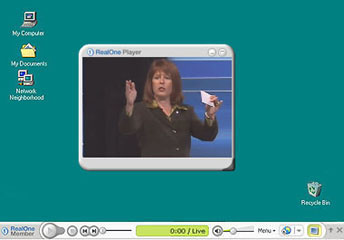
In this mode, the Player Controls are displayed as a Toolbar at the bottom of the computer screen. Video or Visualization images are displayed in a detached Presentation Area and the Media Browser (if enabled) is displayed as a separate detached window. By default, the Presentation Area and Media Browser are hidden when Toolbar mode is first enabled.
Click  to show (or hide) the Presentation
Area.
to show (or hide) the Presentation
Area.
Click  to show (or hide) the Media
Browser
to show (or hide) the Media
Browser
Click  to return to the Normal mode.
or
Click  to open the Toolbar menu
and select the desired display mode.
to open the Toolbar menu
and select the desired display mode.
 Click
here to install screen-reader accessible Help
Click
here to install screen-reader accessible Help